
Paksuper Game Deposit – How to Add Money
Paksuper Game Deposit process is straightforward. Open the Deposit section, choose an available payment method, enter the required payment details and amount, and then confirm the transaction. Paksuper currently supports JazzCash and Easypaisa for deposits.
How Paksuper Game Deposit Works
Here are the key steps to deposit funds in Paksuper game.
1. Log in to your Paksuper Game account
Open the Paksuper website or app and log in with your registered account details. If you do not have a Paksuper account yet, complete the registration process first before making a deposit.
2. Open the Wallet or Deposit section
After logging in, look for Deposit section at footer section to view the payment methods available to your account.

3. Select a payment method
Choose the payment method displayed by Paksuper. This includes:
- JazzCash
- Easypaisa
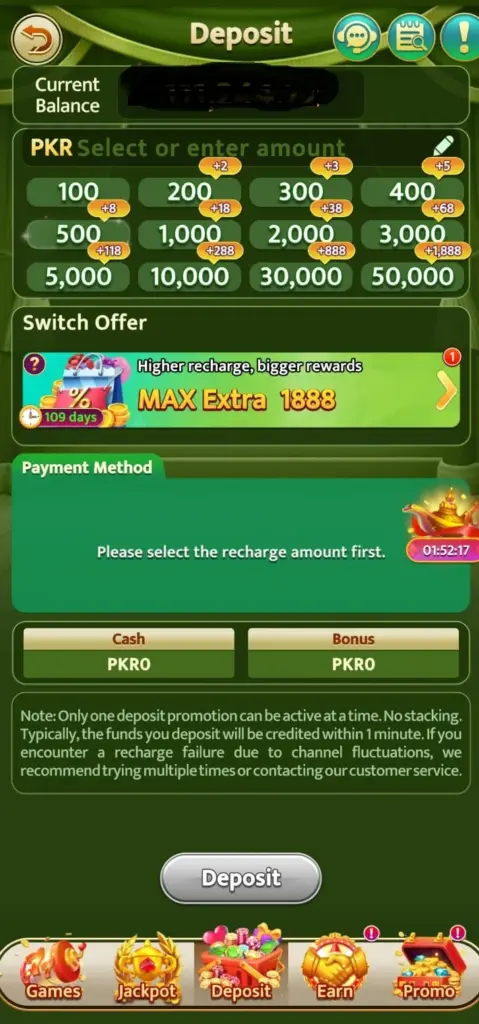
4. Enter the deposit amount
Enter the amount you want to add to your Paksuper account. The minimum deposit amount is PKR 100, while the maximum deposit may be PKR 50,000, depending on the limits of the selected mobile wallet.
Before confirming the transaction, check:
- Deposit amount
- Payment account number
5. Submit the Deposit Request
After entering the deposit amount, submit your deposit request. A new window will open showing the available payment methods and payment link, including JazzCash and Easypaisa. Select your preferred payment method and click Next to continue.
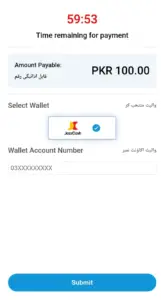
6. Approve from EasyPaisa or JazzCash Mobile Wallet
Open your selected mobile wallet and check the Payment Request section. You should see the fund transfer request from Paksuper Game. Review the amount and transaction details carefully, then authenticate the payment through your mobile wallet to complete the deposit.
7. Complete the payment
As the final step, enter your mobile wallet PIN or password when prompted and authenticate the transaction. Once the payment is successfully completed, return to your Paksuper account and check your updated balance.
8. Check your Paksuper balance
After completing the payment, return to your Paksuper account and check your wallet balance. If the transaction is successful, the deposited funds should be reflected in your account. Any applicable deposit bonus will depend on the promotion, eligibility requirements, and terms shown at the time of the transaction.
What You Need Before Making a Deposit
Before starting a transaction, make sure you have:
- An active Paksuper account
- A stable internet connection
- Access to your selected payment wallet, such as Easypaisa or JazzCash. Make sure your wallet has sufficient balance and that you have enough transaction or sending limit available to complete the deposit.
- JazzCash and Easypaisa Deposits
Paksuper Game’s is supporting JazzCash and Easypaisa for deposits and withdrawals.
What If My Deposit Does Not Appear?
Sometimes it happens when delays in processing the payment from mobile wallet, but the amount does not appear. To resolve this, try to complete the transaction as per stipulated time to reflect it. Secondly if it happens, copy the transaction ID or take a screenshot and send it to customer support. The customer support team will resolve the issue.
Common Deposit Mistakes to Avoid
Deposits Above PKR 50,000
The maximum deposit may be limited to PKR 50,000 per transaction based on the sending limits of the supported mobile wallets. If you attempt to submit a deposit request above PKR 50,000, the transaction may not be processed. Always check the current limits displayed by your selected wallet before making a deposit.
Deposit Below PKR 100
The minimum transfer amount for supported mobile wallets and the Paksuper account is PKR 100. Deposit requests below PKR 100 cannot be processed.
Use the Same Payment Wallet
Make sure you complete the transaction using the same payment wallet you selected when submitting the deposit request. Paksuper sends the payment request to the selected wallet, such as JazzCash or Easypaisa, and the transaction must be authorized from that wallet.
For example, if you select JazzCash when creating the deposit request, complete the payment through the same JazzCash account. Switching to another wallet after submitting the request may cause the transaction to fail.
Your Payment Wallet May Have Reached Its Sending Limit
If you have already used your wallet’s daily or transaction sending limit, the deposit may not be completed. In this situation, the payment wallet can restrict or decline the transfer, and the funds will not be added to your Paksuper account.
Before making a deposit, check your available sending limit and wallet balance. If your limit has been reached, wait until it becomes available again or contact your payment wallet provider for assistance.
Deposit Time Limit
After submitting a deposit request, complete the payment authentication through your selected mobile wallet within the time limit shown on the payment request. If the request expires before authentication is completed, the transaction may fail.
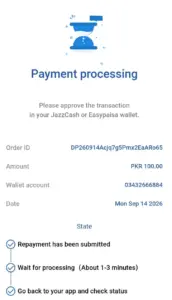
In some cases, the amount may be deducted from your mobile wallet even though it does not immediately appear in your Paksuper Game account balance. If this happens, check the transaction status and save a screenshot of the successful payment or transaction reference. Then contact the Pakuper customer support team and provide the transaction details so they can investigate the issue.
Deposit Safety Checklist
Before confirming a transaction, check:
| Steps | Yes/No |
| I am logged into the correct Paksuper account. | Yes |
| I selected the correct payment method. | Yes |
| The payment number/details are correct. | Yes |
| I am using my own payment account. | Yes |
| I checked the amount before confirming. | Yes |
| I understand any displayed bonus conditions. | Yes |
| I have not shared my PIN or OTP. | Yes |
| I saved the transaction confirmation as screenshot | Yes |
Frequently Asked Questions
How can I deposit money into Paksuper?
Log in to your account, open the Deposit section, select an available payment method, enter the required amount and complete the payment according to the instructions displayed.
Does Paksuper support JazzCash?
Yes, Paksuper supports JazzCash as one of its payment options.
Does Paksuper support Easypaisa?
Yes, Paksuper also supports Easypaisa as well.
What should I do if money is deducted but my Paksuper balance is not updated?
Keep the transaction reference and payment confirmation, check your Paksuper balance again and contact the platform’s support channel. Avoid making a second payment until the first transaction has been resolved.
Should I give my PIN to a Paksuper agent?
No. Never disclose your payment-wallet PIN, OTP or password to another person. JazzCash also explicitly advises customers not to disclose their PIN, OTP or password.
Can I Withdraw My Deposit Amount?
Yes, you can withdraw funds from your Paksuper account, subject to the applicable withdrawal and wagering requirements. If your deposit is linked to a deposit bonus, you may need to complete the required wagering conditions before the relevant balance becomes available for withdrawal.
Once the funds are shown as withdrawable, you can submit a withdrawal request using an available payment wallet, such as JazzCash or Easypaisa.