
Paksuper Registration – How to Create an Account
Paksuper registration process requires you to open the Paksuper website or app, select Register, enter the requested information, and complete any verification step shown during registration.
How to Register on Paksuper
Follow these steps to create a new Paksuper account.
1. Open the Paksuper Website or App
Open the Paksuper website or the app on your device. On the website, look for Register. Select it to open the registration form.
2. Enter Your Registration Details
Complete the information requested on the registration form. The registration interface requires details such as:
- Mobile phone number
- Email address
- Username
- Password
3. Create a Strong Password
Choose a password that is difficult for other people to guess.
4. Complete the Verification Step
After entering your registration information, Paksuper Game will require account verification. The verification involves sending an OTP through SMS. Enter the verification information exactly as instructed on the registration screen.
5. Submit the Registration Form
Review the information you have entered and submit the registration form. If all required information is accepted and the verification process is completed, your Paksuper account should be created.
6. Log In to Your New Account
After registration, use your newly created login details to access your account. Once logged in, you can review the available account features and games before deciding whether to make a deposit.
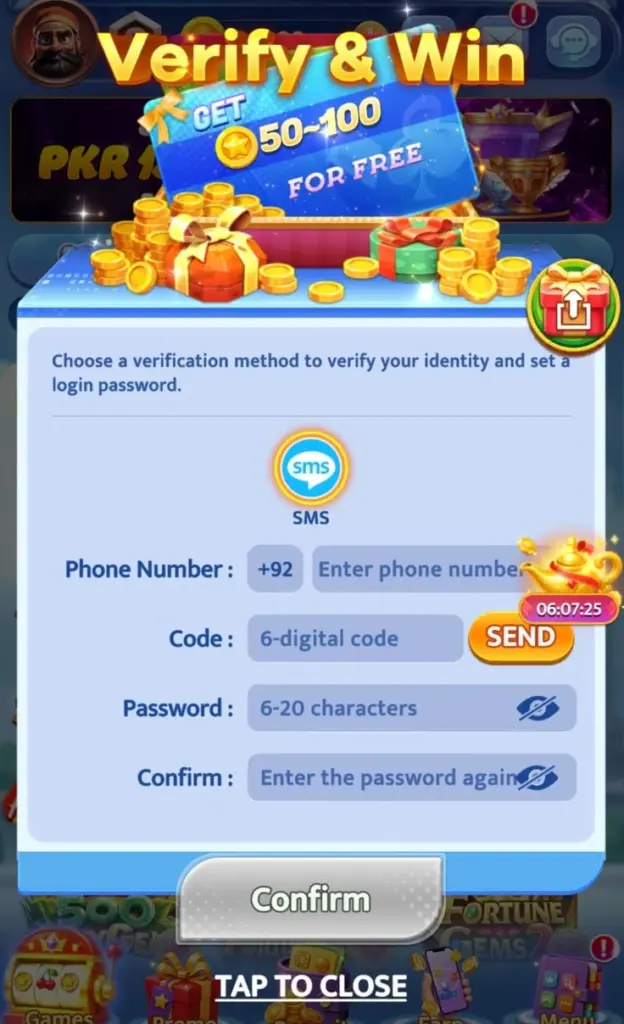
Paksuper Registration Through Mobile
You can complete the registration process from a smartphone using Paksuper website or app. The basic process remains the same:
- Open Paksuper on your mobile device.
- Select Register.
- Enter the requested account information.
- Complete the verification step.
- Submit the registration form.
- Log in using your new account details.
Registration Information and Account Security
The information you provide during registration will be associated with your account. Paksuper’s published privacy policy states that account registration may involve information such as contact details, including a name, email address and telephone number. For your own security:
- Use a unique password.
- Keep your password private.
- Do not share OTPs or verification codes.
- Avoid saving your password on shared devices.
- Log out when using a public or shared device.
- Do not provide account credentials to unofficial agents.
What If Paksuper Registration Does Not Work?
If you cannot complete registration, check the following before contacting support.
- Check Your Internet Connection
- Check Your Information
- Check the Verification Code
- Try Again Later
What If My Mobile Number Is Already Registered?
If the registration form says that your mobile number or other account information is already registered, do not create multiple accounts simply to bypass the message. Instead, try logging in with the existing account or use the available account-recovery option if you cannot remember your credentials. You can also contact Paksuper support if you believe the registration message is incorrect.
Can I Create More Than One Paksuper Account?
Do not assume that multiple accounts are permitted. If Paksuper’s current terms or registration interface specifies an account limit, follow those conditions. Creating additional accounts to bypass promotional, wagering, verification or account restrictions may cause problems. For this reason, it is better to maintain accurate information on the account you actually use.
Do I Need to Deposit Money Immediately After Registration?
No deposit should be assumed to be necessary simply to complete account registration. First complete the registration and review the account and platform information. If you later decide to use real-money features, check the current deposit requirements before transferring funds. Only use money can you afford to lose.
Registration Safety Tips
Creating an account is simple, but protecting the account is important.
Use Your Own Contact Information
Where the platform requests a phone number or email address, use information you can access. This can be important for account verification or recovery.
Protect Your Password
Never send your password to another person through WhatsApp, Telegram, Facebook or another messaging service.
Protect Your OTP
An OTP is a security code. Do not share it with someone who claims they need it to activate, verify or unlock your account.
Avoid Unofficial Registration Links
Be careful with registration links sent through unknown social-media accounts or private messages. Before entering personal information, verify the website address.
Be Careful with Payment Information
Registration does not require you to give your mobile wallet PIN or password to another person.
Frequently Asked Questions
How do I register for Paksuper?
Open the Paksuper website or app, select Register, enter the information requested on the registration form, complete any required verification and submit the form.
What information is required to register?
The platform will request information such as a mobile number, email address, username and password.
Do I need an OTP to register?
If an OTP or other verification step is displayed during registration, complete it using the instructions provided by Paksuper.
Can I register from my mobile phone?
Yes, registration can be completed from a mobile device through the Paksuper website or app.
What should I do if my OTP does not arrive?
Check that you entered the correct contact information, wait briefly and request a new verification code. If the problem continues, contact the platform’s current support channel.
What if my username is already taken?
Choose another available username. The registration form should indicate whether the username you entered can be used.
Can I register without making a deposit?
Registration and depositing are separate steps. You can first create your account and review the available features before deciding whether to add funds.
Is my registration information private?
Paksuper has a published privacy policy explaining how information submitted through its website may be collected and used.